 Willdou
一步一步,清楚了解
跟着界面,找到下一步。
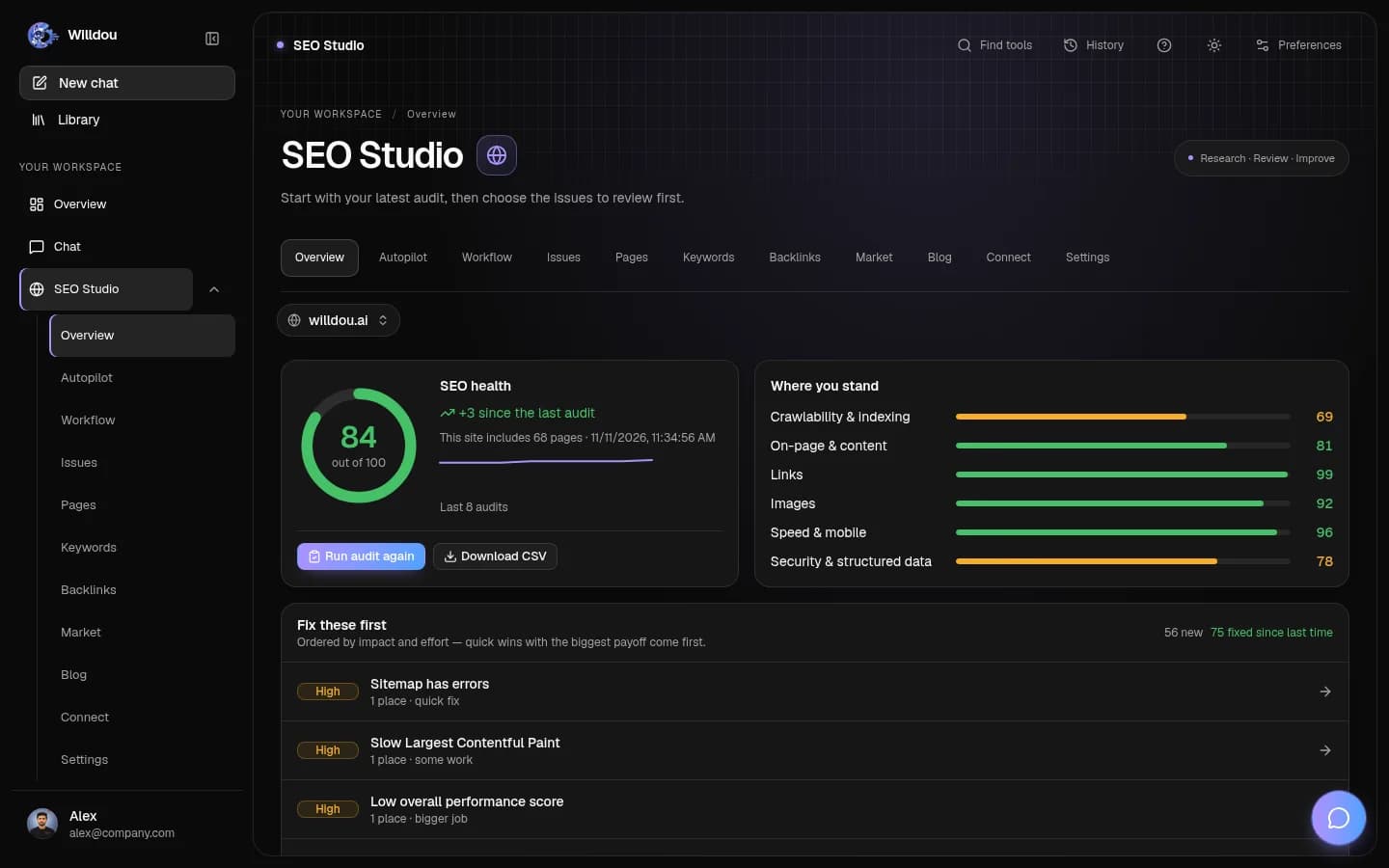
以下为本地文档工作空间的真实界面截图,显示英文按钮名称。空状态不会伪装成已完成任务;你的实际数据和可用功能取决于连接与部署配置。
Website overview
点击位置:Choose SEO Studio, select your website, then choose Overview in the studio tabs.
接下来会看到:Read the latest completed health score, issue groups and audit progress. Start an audit only when you are ready to crawl the site.
选择你的网站查看实际界面截图

Website overview打开原图 Autopilot
点击位置:Choose SEO Studio, select your website, then choose Autopilot in the studio tabs.
接下来会看到:Inspect the current run and its stages. Starting a run requires your action and configured background services; this page alone does not start one.
选择你的网站查看实际界面截图

Autopilot打开原图 Workflow
点击位置:Choose SEO Studio, select your website, then choose Workflow in the studio tabs.
接下来会看到:Review queued, running, failed and completed work. Open a task to inspect its details before retrying or approving anything.
选择你的网站查看实际界面截图

Workflow打开原图 Issues
点击位置:Choose SEO Studio, select your website, then choose Issues in the studio tabs.
接下来会看到:Review findings by priority. Read the explanation and proposed fix before applying it. Missing audit data is not a clean bill of health.
选择你的网站查看实际界面截图

Issues打开原图 Pages
点击位置:Choose SEO Studio, select your website, then choose Pages in the studio tabs.
接下来会看到:Inspect the crawled page list and page-level details. A new site has no pages until a crawl completes.
选择你的网站查看实际界面截图

Pages打开原图 Keywords
点击位置:Choose SEO Studio, select your website, then choose Keywords in the studio tabs.
接下来会看到:Review your keyword research and clusters. Use the available research controls to choose a topic and target market before starting a job.
选择你的网站查看实际界面截图

Keywords打开原图 Backlinks
点击位置:Choose SEO Studio, select your website, then choose Backlinks in the studio tabs.
接下来会看到:Inspect available link evidence. An empty or unavailable data source does not prove that a website has no backlinks.
选择你的网站查看实际界面截图

Backlinks打开原图 Market
点击位置:Choose SEO Studio, select your website, then choose Market in the studio tabs.
接下来会看到:Review competitor and market research for the selected website. Start analysis deliberately and inspect its sources.
选择你的网站查看实际界面截图

Market打开原图 Connect
点击位置:Choose SEO Studio, select your website, then choose Connect in the studio tabs.
接下来会看到:Choose the website or Google integration you need. Complete the connection test before allowing writes. Never paste credentials into chat or a public screenshot.
选择你的网站查看实际界面截图

Connect打开原图 Blog
点击位置:Choose SEO Studio, select your website, then choose Blog in the studio tabs.
接下来会看到:Review blog drafts and their status. Open a draft to inspect it before publishing; available destinations depend on a working connection.
选择你的网站查看实际界面截图

Blog打开原图 Website settings
点击位置:Choose SEO Studio, select your website, then choose Settings in the studio tabs.
接下来会看到:Inspect audit frequency, SEO mode, website limits and automation controls. Saving a schedule changes future behavior, so confirm the destination and frequency first.
选择你的网站查看实际界面截图

Website settings打开原图
添加网址并审核
先输入公开可访问的网站地址。无需 CMS 凭据即可审核;公开 URL 检查会拒绝私有网络地址。
- 打开 SEO Studio 并添加网址。
- 运行首次审核。
- 等待页面抓取和检查完成。
- 阅读健康评分、分类结果和优先问题。
理解结果
审核包含可抓取性、页面内容、链接、图片、速度及结构化数据。问题数量不是搜索排名预测;评分也不保证排名。速度检查依赖 Lighthouse 服务。
查看 Pages、Issues 与 CSV 导出。多次运行可以比较变化。人工标记修复与实际应用修改是不同操作。
关键词与外链
研究使用真实联想词、搜索结果和趋势信号。关键词难度是产品分析,不是专有指数。没有配置数据源时,不会提供精确搜索量或 CPC。
外链需在引用页面中找到实际链接才能确认。Common Crawl 任务可能耗时很长。
连接并应用修改
支持 WordPress、Shopify、SFTP 和 FTP。只连接您有权管理的网站,并使用权限受限的凭据。
- 在 Connect 中选择连接类型并测试。
- 检查每项建议的旧值与新值。
- 明确批准后再应用。
- 从修改记录撤销受支持的更改。
常见问题
抓取失败时检查公开访问、robots 和服务器响应。没有搜索数据时检查 Google 授权。部分主题或页面构建器内容无法通过普通正文接口修改;这类问题应显示限制,而不是假装修复。